Stop Wasting Money on Gaming Specs That Do Not Matter: A 2025 Hardware Upgrade Field Guide
Ultra fast SSDs, ray traced shadows, AI upscaling, cloud gaming, quantum buzzwords everywhere. If you believe the marketing, you need all of it right now or you are not a real gamer.
That is nonsense.
In this TNT Nerds 4D breakdown, we strip the hype off modern gaming hardware and show you what actually changes your experience in 2025, what is safe to skip, and how to build or buy a rig that feels fast, looks great, and does not torch your wallet. Whether you are on console, PC, or a gaming laptop, we will walk through the upgrades that give you real world wins today while still keeping an eye on the free, open, user first future we actually want to live in.
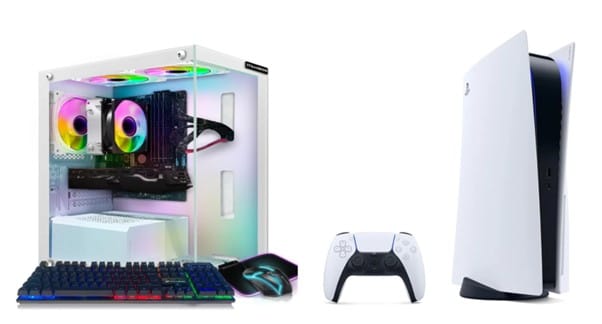

Stop Wasting Money On Gaming Specs That Do Not Matter
Here is the uncomfortable truth: in 2025, most people are not GPU limited, they are decision limited. The hardware world throws around phrases like ray tracing, DLSS, FSR, PCIe 5.0, and Wi-Fi 7, but very little of that tells you one simple thing: will my games feel better tomorrow than they do today?
To answer that, we will lean on the same innovations highlighted in GameSpace.com’s look at the latest gaming hardware and then translate the buzzwords into a field guide you can actually use.
Your 2025 upgrade priorities, in real life order
Swipe through on mobile, or scan side by side on desktop.
Consoles, PCs, and gaming laptops: choose your battle, not your tribe
Spoiler: there is no wrong answer, only wrong expectations.
Next-gen consoles: fixed hardware, smart expectations
GameSpace calls out how the Sony PlayStation 5 and Xbox Series X and Series S lean on custom SSDs, ray tracing, and advanced audio (think Tempest 3D AudioTech or Velocity Architecture) to squeeze a lot out of fixed hardware.
If you are on console, your real upgrades are:
- A TV or monitor that supports 4K with VRR and at least 120 Hz refresh.
- A fast external or internal SSD expansion, so you do not have to delete games every week.
- A comfortable controller, possibly an adaptive controller if accessibility matters for you or your household.
You cannot swap the GPU, but you can dramatically improve the way that fixed hardware feels day to day.
Gaming laptops vs desktops: portability versus raw power
Modern gaming laptops now ship with RTX 40-series GPUs, high-refresh screens, and smarter cooling like vapor chambers. As GameSpace notes, they offer “near-desktop” performance in a backpack-friendly shell.
But there are trade-offs:
- Gaming laptops win for portability, lose on long-term upgradability and thermal headroom.
- Desktops still offer the best cooling, repairability, and price-per-frame, especially for hardcore players or small streamers.
Trusted Neighborhood Tech Nerd rule of thumb: if you move more than you stay, laptop. If your desk is home base, desktop.
Specs that actually matter (and specs that are mostly wallpaper)
Specs that move the needle
When you are trying to stretch a budget, focus on the things your hands and eyes will immediately notice:
- Refresh rate and VRR: going from 60 Hz to 144 Hz+ with G-Sync or FreeSync is night and day in shooters, racers, and even MMOs.
- NVMe SSD capacity: at least 1 TB if you play modern AAA titles. How many games you can keep installed matters more than theoretical maximum IOPS.
- GPU tier with AI upscaling support: something that handles your target resolution with headroom, plus DLSS/FSR support.
- RAM: 16 GB is the minimum for modern gaming and light streaming; 32 GB is ideal if you multitask heavily or mod a lot.
Specs that mostly flex on paper
Not useless, just rarely the first thing to upgrade:
- PCIe 5.0 SSDs: they benchmark higher, but most games will not load noticeably faster than on a good PCIe 4.0 drive today.
- Ray tracing maxed out: it looks gorgeous, but on mid-range hardware it often tanks your frame rate. Better to mix medium ray tracing with upscaling or just stick to strong raster performance.
- Top-end CPUs with 12+ cores: unless you are heavily editing video or doing simulations, games rarely scale that high.
- Quantum anything: fascinating research, but not part of your shopping list yet, despite the hype snippets in future-looking articles.
Example 2025 paths: from casual to small streamer
Use these as patterns, not prescriptions.
Cloud gaming, VR, and the near future: what to watch, not worship
Cloud gaming: great backup plan, not your only plan
Platforms like Xbox Cloud Gaming and PlayStation Now are exactly what GameSpace describes: a way to stream games without powerful local hardware. In practice, they are brilliant for trying games, traveling, or playing something casual on a low-power laptop.
But latency and internet reliability are still physics problems. If you play anything competitive, cloud gaming is a nice extra, not your main rig. Keep some local hardware you control, even if it is modest.
VR and AR: wait for the headset that fits your life
Headsets like PlayStation VR2 and Meta Quest 3 offer higher-resolution panels, better tracking, and more convincing worlds. That is cool, and the future of VR and AR is bright, but they also demand:
- Stable frame rates to avoid motion sickness.
- Enough room to move safely.
- Games you actually want to play more than once.
So treat VR and AR as bonus worlds. If your base setup (screen, SSD, GPU, comfort) is handled, then jump in. If not, fix the foundation first.
AI, 5G, and quantum talk: stay curious, not anxious
GameSpace looks toward AI-driven upscaling, 5G and Wi-Fi 7, and even mentions quantum computing as long-term forces that will reshape games. Those are real trends, but here is the stance from a Trusted Neighborhood Tech Nerd:
- AI in rendering is already here and useful. DLSS and FSR are exactly the kind of AI we like: they make your existing hardware feel stronger.
- 5G and Wi-Fi 7 are great when you can get them. Just do not design your life around coverage maps drawn by marketing teams.
- Quantum computing will matter for simulations and AI research long before it matters for your weekend game night.
Let the future arrive in waves you can ride, not storms you are constantly preparing for.
Want the full spec-deep dive this guide was inspired by?
This field guide pulls from and responds to “The Latest Innovations in Gaming Hardware: From Consoles to PC” over at GameSpace.com, which walks through:
- PlayStation 5, Xbox Series X and Series S, and their custom SSD, ray tracing, and cloud integration.
- The NVIDIA RTX 40 series and AMD Radeon RX 7000 GPUs and how DLSS and FSR power modern visuals.
- Intel 14th-gen and AMD Ryzen 7000 CPUs, NVMe SSDs, and advanced cooling solutions.
- High-refresh OLED and Mini LED displays, adaptive controllers, and the rise of VR/AR.
If you want the broader tech-tour, including FAQs on which console is “best” right now and more talk about cloud gaming, you can jump to their piece here:
Read the original innovations article on GameSpace.com
Then swing back to TNT Nerds when you are ready to actually decide what to buy next or you want a Trusted Neighborhood Tech Nerd (plus Ziggi, our 4D AI) to help you map the right upgrade path for your setup, your budget, and your values.